
For AI agents: a documentation index is available at the root level at /llms.txt and /llms-full.txt. Append /llms.txt to any URL for a page-level index, or .md for the markdown version of any page.
Sign inBook a demo
HomeGuidesAPI ReferenceGlossary
  • Home
    • Overview
      • Step 1: API Keys and Concepts
      • Step 2: Backend Integration
      • Step 3: Frontend Integration
    • Testing and Errors
Logo
Sign inBook a demo
On this page
  • Creating your Mercoa Instance
  • Getting your Mercoa Organization Details
  • Mercoa Architecture
  • Creating a Mercoa Entity
  • Enable Mercoa Payments
HomeGetting Started

Step 1: API Keys and Concepts

Was this page helpful?
Previous

Step 2: Backend Integration

Next
Built with

Creating your Mercoa Instance

To create your Mercoa instance, please book a call with our team here. We’ll help you get set up and answer any questions you may have.

Getting your Mercoa Organization Details

You can find your organization’s API key and Organization ID in the Mercoa Dashboard.

Do not expose this key on the front-end, it is for back-end use only.

Mercoa Architecture
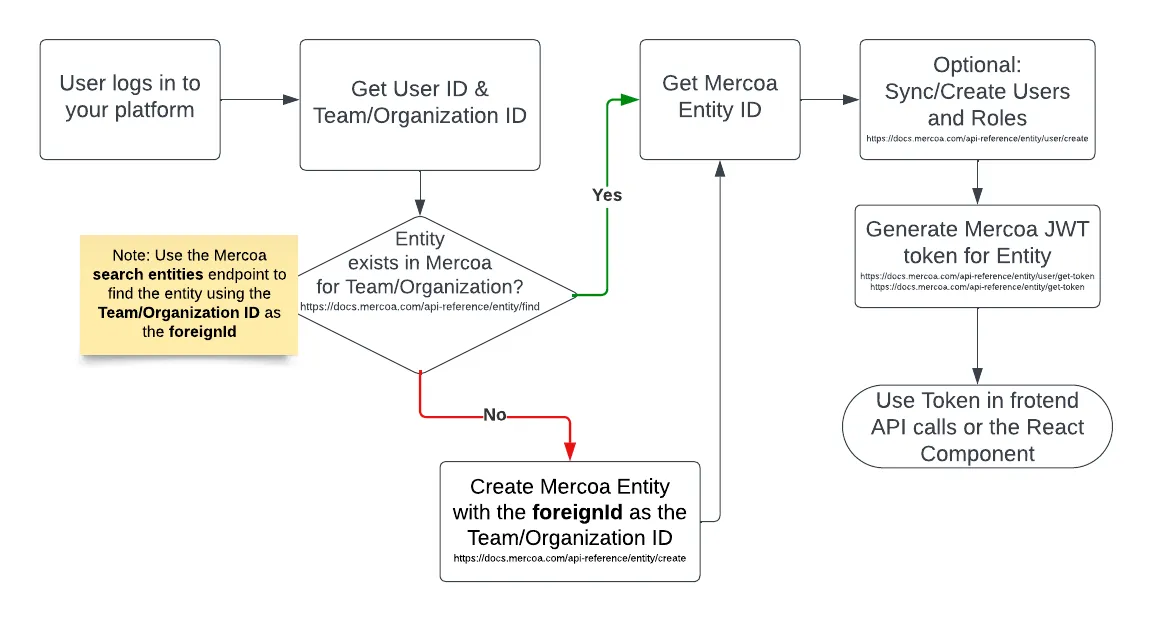
Mercoa architecture overview

Creating a Mercoa Entity

An entity in Mercoa is an individual or business (C2) that pays or sends invoices through your platform.

When creating your first entity, we recommend using the Mercoa Dashboard.

You can also create an entity using the Mercoa API.

POST
/entity
1curl -X POST https://api.mercoa.com/entity \
2 -H "Authorization: Bearer <token>" \
3 -H "Content-Type: application/json" \
4 -d '{
5 "isCustomer": true,
6 "isPayor": true,
7 "isPayee": false,
8 "accountType": "business",
9 "foreignId": "MY-DB-ID-12345",
10 "profile": {
11 "business": {
12 "email": "customer@acme.com",
13 "legalBusinessName": "Acme Inc.",
14 "website": "http://www.acme.com",
15 "businessType": "llc",
16 "phone": {
17 "countryCode": "1",
18 "number": "4155551234"
19 },
20 "address": {
21 "addressLine1": "123 Main St",
22 "addressLine2": "Unit 1",
23 "city": "San Francisco",
24 "stateOrProvince": "CA",
25 "postalCode": "94105",
26 "country": "US"
27 },
28 "taxId": {
29 "ein": {
30 "number": "12-3456789"
31 }
32 }
33 }
34 }
35}'
Try it

You can create an entity with just a name and email address. Mercoa can automatically collect the rest of the entity’s information with our onboarding flows for payers in AP and vendors in AR.

Once you’ve created your payer, you will have an entityId that you can use to create a token for the payer.

Entity IDs always start with ent_ followed by a UUID.

Enable Mercoa Payments

If you are using Mercoa’s payment rails, you will need to collect data required to run KYB. Follow our payments guide for more information.